|
<< Click to Display Table of Contents >> Virola Server and Administration > Server configuration > Virola Server configuration settings > Virola Server troubleshooting |
Troubleshooting
The following options showed in the administrator toolbar are used for Virola debugging, issues troubleshooting and server load monitoring:
1.Server Health. Through Administrator / Server health menu you can check CPU load, consumed RAM and used disk space.
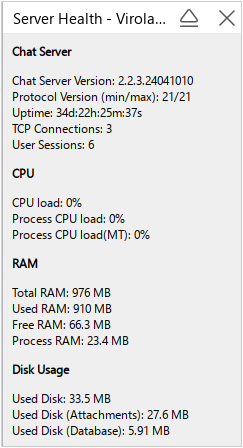
Virola server health
2.Server Crash Reports. If Virola server got crashed for some reason, Virola admin will be able to see latest reports through Administrator / Server Crash Reports menu.
3.Simulate Server Crash. You can use this option to restart Virola server from the Virola client menu.
4.Clear Cache in RAM on server