|
<< Click to Display Table of Contents >> Virola Client > Virola app configuration > Audio processsing |
General
Audio processing tab allows you to control the sound quality settings. For real-time internet communication Opus audio codec is used in Virola. It delivers exceptionally low latency and adaptive quality, making it a standard for voice/video conferencing (WebRTC), gaming, and streaming.
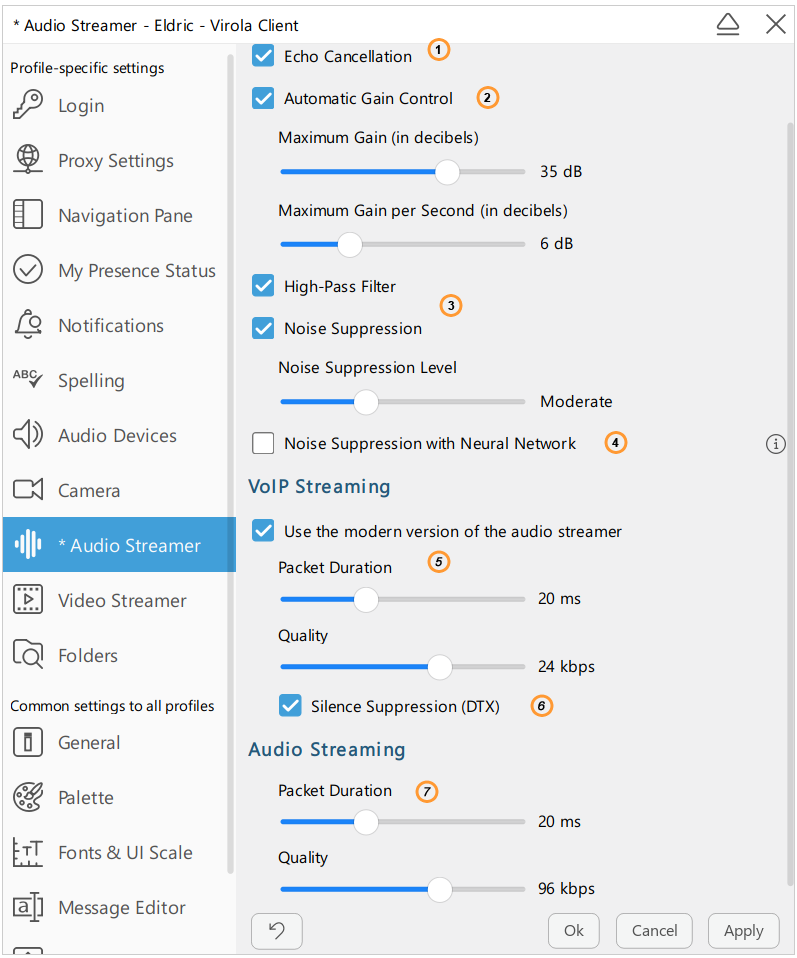
Audio processing settings
1.Echo cancellation. This option is needed when a far end signal (voice originating at the other end of a line of communication) is played over a loudspeaker into a reverberant acoustic space and is picked up by a microphone
2.Automatic Gain Control. Automatic Gain Control is an audio pre-processor which automatically normalizes the output of the captured signal by boosting or lowering input from the microphone to match a preset level so that the output signal level is virtually constant.
3.Noise Suppression. If this option is enabled the noise will be removed from a signal.
4.Noise Suppression with Neural Network. This option is recommended for high-noise environments as it provides aggressive suppression of all external sounds.
5.Use the modern version of the audio streamer. An improved version of the audio streamer will be enabled. It is supported by Virola servers and client releases after April 5, 2026.
6.Silence suppression (DTX). Disables audio streaming when a user is silent. This helps to save Internet traffic.
7.Audio streaming:
•Packet Duration. It is the amount of time in milliseconds that the audio data inside a single network packet represents. The most common duration for audio codec Opus is 20ms (50 packets per second), though it can range from as low as 5ms to 60ms or more.
•Quality. Bitrate is the primary measure of quality because it determines how much data is processed every second to represent the sound. A higher bitrate generally results in superior audio fidelity, but also requires more Internet bandwidth.